
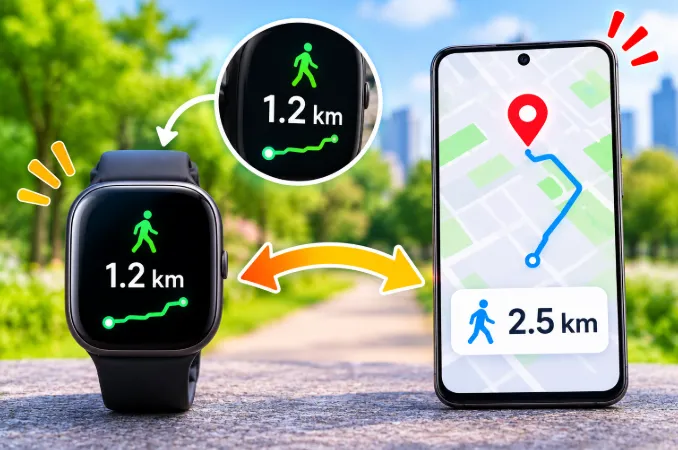
You walk your usual route, glance at your wrist, and the watch says 3.4 km. Your phone map says 3.0 km. A friend's watch showed something else on the same walk. So who is right?
Usually, nobody is exactly right. A smartwatch does not measure distance the way a measuring wheel does. It estimates it, and the quality of that estimate depends on settings, signal and how you walk. Once you understand how the number is built, you can find the reason for your error and shrink it a lot.
Quick answer: A smartwatch shows incorrect walking distance mainly because it multiplies counted steps by an assumed stride length, or because its GPS signal is weak or sampled too rarely. Wrong stride data, missed steps from a still arm, the wrong workout type, power saving mode and conflicting health app data are the most common causes. Calibrating outdoors with GPS, correcting your profile and choosing the right workout mode fixes most cases.
How a Smartwatch Actually Calculates Walking Distance
Most people assume the watch tracks the path they travel. It does not, at least not always. There are two very different methods, and your watch switches between them depending on the situation.
Method 1: Steps multiplied by stride length
When GPS is off or unavailable, such as indoors, on a treadmill, or during all-day tracking, the watch uses its accelerometer to count steps. It then multiplies that count by an estimated stride length.
Distance = steps × stride length
Both parts can be wrong. The step count may be slightly off, and the stride length is often a guess built from the height you entered. A small error repeated thousands of times becomes a large one. A stride that is only 4 cm off, across 5,000 steps, already adds up to 200 metres.
Method 2: GPS tracking
During an outdoor walk with GPS active, the watch records location points every second or so and adds up the lines between them. This is usually more accurate than step-based estimation, but it has its own weaknesses, such as signal reflection, slow lock and reduced sampling, which are covered below.
Why this matters for your wrong reading
If distance is wrong during casual all-day walking, the usual culprit is the stride estimate. If it is wrong during a tracked outdoor walk, the usual culprit is GPS quality or settings. Knowing which situation you are in cuts troubleshooting time dramatically.
The Most Common Reasons Your Smartwatch Distance Is Wrong
Your stride length is a default or an estimate
Many watches never learn your real stride. They use a formula based on height. As a rough rule, walking stride is about 0.41 to 0.42 times your height, but real people vary with leg length, posture, fitness and speed.
If you are tall but take short steps, or short but take long steps, the watch will drift in the same direction every time. That consistent drift is the biggest clue that stride length is the problem, not the sensor.
You walk without swinging your arm
A wrist-worn watch detects steps largely from arm movement. When the arm stays still, steps can be missed. This happens when you:
- Hold a phone in your hand while walking
- Carry a bag, umbrella, shopping or a coffee
- Push a stroller or trolley
- Keep your hands in your pockets
- Hold a dog leash with the watch arm
- Grip the handrails on a treadmill
In these cases steps are under-counted, so distance is under-reported. People rarely expect this, and it explains many cases of a watch that shows less distance than reality.
The wrong workout type is selected
This one is easy to miss. If you start a generic walk or an indoor walk while you are actually outside, the watch may ignore GPS and rely only on steps and stride. If you use an outdoor mode on a treadmill, the watch may wait for a GPS signal that never arrives and then fall back to poor estimates.
Match the mode to the place: outdoor walk with GPS outside, indoor walk or treadmill mode inside.
Your walking speed changes your stride, but the watch assumes it does not
Stride length is not fixed. Slow strolls use short steps, and brisk walks use longer ones. A watch that applies one average stride to everything will overestimate slow walks and underestimate fast ones.
If distance is accurate on your brisk morning walk but wrong when you stroll with family, this is the reason.
GPS signal is bouncing between buildings
In dense streets with tall buildings, satellite signals reflect off glass and concrete before reaching your watch. This is called multipath error. The watch thinks you zig-zagged across the road, so the recorded path becomes longer than the real one.
The result is usually a total that is too high. Tree cover, tunnels, underpasses and covered walkways create similar errors. Open parks and wide roads give cleaner results.
GPS has not locked on when you start
Many people press start and begin walking at once. For the first minute the watch may still be searching, and it fills the gap with step-based estimates or a rough early fix. That alone can add or remove a few hundred metres from a short walk.
Power saving mode reduces GPS accuracy
Battery saver and ultra-power modes often lower how frequently the watch samples your location. With fewer points, curves are cut into straight lines and the total shrinks. If your watch began under-reporting right after you enabled battery saving, check that setting first.
The watch is worn too loose or in the wrong position
A loose strap lets the watch slide and rotate, which confuses the motion sensors. A snug fit, roughly one finger-width behind the wrist bone, gives the cleanest signal. Wearing it on the dominant wrist can also add noise because that arm does more tasks during the day.
Your profile data is outdated or incorrect
Check the height, weight, age and units in the companion app. A wrong height, even by 5 to 10 cm, directly changes the stride estimate. Units set to miles instead of kilometres can create what looks like a huge error but is really a display difference.
Different devices measure differently
When you compare your watch to a phone, a friend's tracker or a gym treadmill, you are comparing different algorithms and different placement. A phone sits in a pocket or bag and moves differently from a wrist. A treadmill calculates distance from belt speed and can itself be miscalibrated. A disagreement between two devices does not prove either one is right.
Why the Watch and Your Health App Show Different Distance
Sometimes the watch is fine and the confusion lives in the phone. Health apps such as Apple Health, Google Fit and Samsung Health merge data from several sources: your phone, your watch and any third-party fitness apps. Depending on source priority, the app can show phone-only data, watch-only data or a blend.
This is why you might see 4.1 km on the watch screen and 3.6 km in the health app for the same walk.
How to check and fix data-source conflicts
- Open the health app's data sources or app permissions section
- Move the watch above the phone in priority for steps and walking distance
- Disconnect third-party fitness apps that write duplicate steps or distance
- Make sure your phone is not counting steps while it sits in a bag during a watch-tracked walk
- Finish a fresh walk, then compare the watch screen, the workout summary and the health app total
If the watch workout summary is correct but the daily total is off, the problem is source merging, not the sensor.
Is a Small Difference Normal?
Yes. Consumer wearables are estimators, and a difference of several percent from the true distance is common. Under open sky with GPS, many watches land quite close. Indoors, in dense cities or without GPS, the gap widens. Exact figures vary by brand, model and conditions, so treat any specific percentage you read online as a ballpark, not a guarantee.
You should look deeper when:
- The error is large and always in the same direction
- Distance changes dramatically between identical walks
- The watch records distance while you are standing still
- Steps are counted while you are driving or typing
Those patterns suggest a settings problem, a sensor issue or a software bug rather than normal estimation error.
How to Test Your Smartwatch Distance Accuracy
Instead of guessing, run a simple test. It takes about 15 minutes and shows exactly where the problem is.
Step 1: Choose a known distance
Use a running track (a standard lap is 400 metres), a measured park loop or a route you have checked on a mapping app. A straight, open road away from tall buildings gives the cleanest result.
Step 2: Walk it twice in two modes
First, walk it with GPS tracking on and the watch fixed on your wrist. Then walk it again in an indoor walking mode, or with GPS off, so only steps are used.
Step 3: Compare the results
- GPS walk accurate, step walk off: your stride length is the problem.
- Both off in the same direction: check wear position, arm swing and firmware.
- GPS walk off, step walk fine: check GPS signal, location permissions, workout type and power saving.
Step 4: Work out your real stride length
Divide the true distance by the number of steps the watch counted.
Real stride length = known distance ÷ steps
For example, 400 metres walked in 560 steps gives a stride of about 0.71 metres. If your watch or app lets you enter stride length manually, use this number.
How to Fix Incorrect Walking Distance
Calibrate using an outdoor walk
Most major watch platforms learn your stride from outdoor walks with GPS. Walk at your normal pace, under open sky, for around 15 to 20 minutes. Do not hold your phone in your hand and avoid frequent stops. Some platforms then use that data to improve later indoor and no-GPS estimates.
Update your height and body details
Open the companion app and confirm that height, weight, age and gender are accurate. This is the fastest fix and the one people skip most often.
Set stride length manually if available
Some apps allow a custom stride length. Use the number from your test. If the option is missing, calibration is the better route.
Select the correct workout type
Use an outdoor walk mode with GPS outside and an indoor or treadmill mode inside. Do not rely on an all-day step count when you care about exact distance.
Wait for GPS lock before you start
Let the watch show a GPS-ready signal, or wait 20 to 30 seconds outdoors before pressing start. This stops the shaky first minute from distorting your total.
Turn off aggressive battery saving during workouts
Choose standard or high-accuracy tracking when distance matters. Keep battery saver for ordinary days.
Adjust the strap and wrist position
Tighten the band so the watch does not slide, and wear it on the same wrist consistently. Switching wrists can interfere with learned motion patterns.
Update the watch and companion app
Firmware updates often adjust step detection and GPS handling. Update both the watch and the phone app, then restart the watch.
Check location permissions on the phone
Many watches borrow the phone's GPS. The companion app needs location access set to always or while using, with precise location turned on. A blocked or approximate-only permission quietly reduces accuracy.
Reset and re-pair as a last resort
If nothing works and the error is large, back up your data and re-pair the watch. A corrupt calibration profile can persist until you do this. For a shorter list of quick fixes, see our separate guide on a smartwatch that shows the wrong walking distance.
Smartwatch Distance Problems by Brand
Menu names and paths change between app versions, so treat the paths below as a guide and check your own app if something looks different.
Apple Watch
Apple Watch learns your stride from outdoor walks with GPS. Walk outdoors for around 20 minutes at a normal pace with open sky. If distance stays consistently wrong after months of use, you can reset the learned data in the Watch app on iPhone (look under General > Reset for the fitness calibration option), then recalibrate with a fresh outdoor walk. Also check that Motion & Distance and Location Services are enabled for fitness tracking on the iPhone.
Fitbit
Fitbit lets you set walking stride length manually in the app's personal or advanced settings. If steps look right but distance does not, adjust the stride value using the formula from the test above. This is one of the few cases where a manual fix works directly.
Garmin
Garmin estimates stride from your profile unless GPS is active, so keep height and profile data current in Garmin Connect. For walks, use the dedicated walk activity with GPS on instead of relying on the daily step count.
Samsung, Xiaomi, Amazfit and Huawei
These brands usually depend on profile height and a built-in stride estimate. If the app has no stride setting, the most reliable options are to use a GPS-based outdoor activity, keep the profile accurate and, as a shortcut, adjust height slightly to compensate for a consistent error.
Why Distance Can Be Wrong Even When Steps Look Right
This is one of the most confusing situations, and many articles skip it. Your step count may match your expectation, yet the distance looks wrong. That happens because steps and distance are two separate calculations.
Steps come from the accelerometer pattern. Distance comes from a stride estimate or GPS. A watch can count 6,000 steps accurately and still convert them into the wrong distance because the stride value behind the conversion is off. So do not trust distance just because your steps look fine, and do not distrust steps just because distance is off.
Treadmill and Indoor Walking Errors
On a treadmill, your watch has no GPS and often limited arm swing, especially if you hold the rails. Two errors can stack: the watch under-counts steps, and the treadmill itself may be miscalibrated.
To improve results:
- Let your arms swing freely for at least part of the session
- Use the treadmill or indoor walk mode, not an outdoor mode
- Compare the watch with the treadmill display over a known distance
- Trust the watch for weekly trends rather than exact numbers from one session
When the Problem May Be Hardware or a Bug
Settings explain most cases, but sometimes the cause is deeper. Suspect a real fault if:
- Steps are counted while your wrist is still, such as during typing or driving
- The watch logs long distances with no movement
- The error started right after an update
- The same inaccuracy appears on every walk, even in open sky, after calibration
Restart the watch, update the firmware and contact the manufacturer if the issue stays. Other readings can also look inconsistent between devices, which we explained in our post on why a watch health rating can be lower than the phone's.
Tips to Keep Walking Distance Accurate Long Term
- Calibrate again if your walking style changes, for example after weight loss, injury or new shoes
- Wear the watch the same way every time
- Use GPS for outdoor walks and indoor mode for indoor ones
- Compare weekly totals instead of single walks
- Keep firmware current and review your profile every few months
Frequently Asked Questions
Why does my smartwatch show more distance than my phone?
A watch captures arm movement and may use a generic stride, while a phone in a pocket or bag moves differently. The watch can also over-record in cities because of GPS drift. Neither is guaranteed to be correct, so test against a known route.
Why does my smartwatch show less distance than the real distance?
The usual causes are missed steps from carrying items or not swinging your arms, power saving mode lowering GPS sampling, the wrong workout type, or a stride length that is set too short in your profile.
Does a smartwatch measure distance without GPS?
Yes, but only as an estimate. It multiplies counted steps by your stride length, which is why accuracy depends so heavily on correct profile data and calibration.
How accurate is smartwatch walking distance?
Under open sky with GPS, many watches come fairly close to the true distance. Without GPS, in dense cities or indoors, errors grow. The only reliable way to know your own watch's accuracy is to test it on a known distance.
Why does my watch show the right steps but wrong distance in the Health app?
The app may be merging phone and watch data, or the stride estimate may be wrong. Check data-source priority first, then verify the stride with a measured walk.
Why is my Apple Watch distance wrong after an update?
Updates can change how calibration data is applied. Recalibrate with an outdoor GPS walk, and reset calibration data only if the problem continues.
Why does my fitness band measure less distance than my phone?
A band on the wrist misses steps when your arm does not swing, while a phone in a pocket tracks body movement more directly. Carrying items or holding rails makes the gap bigger.
Should I wear my smartwatch on my dominant hand?
It can work, but the non-dominant wrist is usually steadier for step detection. The most important thing is consistency, so wear it on the same wrist every time.
Why does my watch count distance when I am not walking?
Repetitive arm movements such as washing dishes, cooking or driving over bumps can mimic steps. Better calibration and firmware updates reduce this, but it never disappears completely.
Can I fix smartwatch distance by changing my height in the app?
To a degree, yes. Increasing height lengthens the estimated stride, which raises distance. It is a workable shortcut, but setting an exact stride length or calibrating outdoors is cleaner.
Does strap tightness affect distance accuracy?
It affects heart rate and step detection more than GPS, but a loose watch that slides adds noise to the motion sensor and can reduce step accuracy.
Is a smartwatch good enough for tracking weight loss walks?
Yes, if you use it for trends. Consistent over- or under-reporting still shows whether you are walking more from week to week, even when the exact distance is not perfect.
Why is my watch distance different every day on the same route?
GPS conditions change with weather, satellite position and signal reflections. Your walking speed and carrying habits also vary, so some day-to-day variation is normal.