
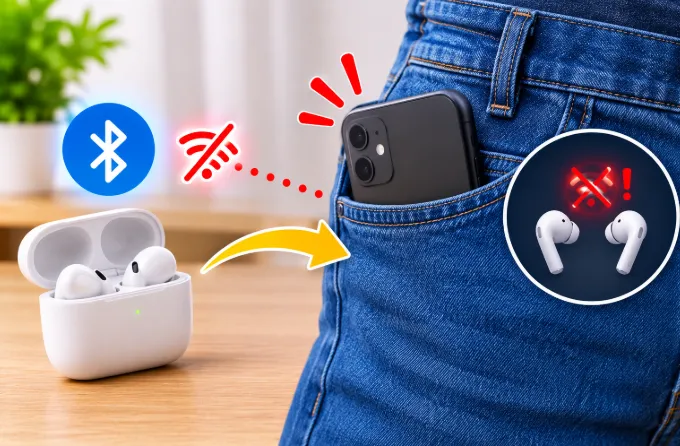
You press play, slide your phone into your pocket, and a few seconds later the music stutters, one earbud goes silent, or the whole connection drops. Pull the phone out and everything snaps back.
That pattern is not random, and it rarely means your earbuds are broken. It comes from how Bluetooth radio works, where the antennas sit, and a handful of settings that make a weak link even weaker. This guide explains what is really happening, how to tell a dropout from a true disconnect, and which fixes work on iPhone and Android.
The Short Answer
Bluetooth earbuds talk to your phone over a low-power 2.4 GHz radio signal. Your body is mostly water, and water absorbs that frequency well. When the phone sits in a pocket, your leg, hip, or arm can sit between the phone’s antenna and the earbuds. The signal weakens, data packets get lost, and the audio stutters or the link breaks.
The problem grows when the earbud antenna is tiny, the phone sits in an unlucky position, or the connection is asked to carry more data than a weak link can handle.
Dropout vs Disconnect: Which One Are You Having?
Most articles treat every cut-out as the same thing. They are not, and the difference tells you where to look.
Stuttering or Choppy Audio
If the music crackles, skips, or turns robotic but the earbuds stay connected, the signal is weak. Packets are arriving late or not at all. This points to body blocking, phone position, interference, or a codec that is too demanding.
One Earbud Goes Silent
If one bud cuts out while the other keeps playing, the link between the phone and one bud, or between the two buds, is failing. This is usually a primary and secondary bud issue, covered below.
Full Disconnect With a Reconnect Sound
If you hear a disconnect tone, then a reconnect tone a few seconds later, the link fully broke. Weak signal can cause this, but it also points to power management, a pairing problem, or the earbuds switching to another device.
Audio Pauses and Resumes by Itself
If the music pauses and then resumes without any disconnect sound, suspect the sensors in the earbuds, not Bluetooth. This is covered in the in-ear detection section.
Knowing which of these four you have saves a lot of random troubleshooting.
Why Your Body Blocks Bluetooth
The Human Body Absorbs 2.4 GHz Signals
Bluetooth uses roughly the same frequency band as a microwave oven, though at a tiny fraction of the power. Human tissue is largely water, so it absorbs a good share of a signal passing through it. A connection that is perfect across a room can fail when the signal has to pass through your thigh and torso.
The Signal Path Is Longer Than You Think
Your phone in a pocket sits at hip or thigh height. Your earbuds sit in your ears, about a meter above it. The signal must travel diagonally upward, often through your abdomen or arm. Earbuds have very small antennas and low transmit power to save battery, so there is little margin for that extra obstruction.
Why It Works Fine at a Desk
At a desk, the phone is usually in clear line of sight, a few feet away, with nothing absorbing the signal. Your earbuds are not getting better at a desk. They are simply not being asked to work against your body.
Why Only One Earbud Disconnects
This is one of the most searched versions of the problem, and most answers stop at "re-pair them." The real answer depends on how your earbuds are built.
Relay Design: One Bud Talks to the Phone
In many true wireless earbuds, the phone connects to one primary bud. That bud then passes the audio to the second bud. If the phone is in your right pocket but the primary bud is in your left ear, the signal has to cross your whole body to reach it. The shielded side fails first, and you hear one ear drop out.
In this design, the secondary bud depends on two links: phone to primary, then primary to secondary. The link between the two buds also passes through your head, which is another place the signal can weaken.
Mirroring Design: Both Buds Listen to the Phone
Newer chipsets and some premium earbuds use a mirroring approach, where the phone link is shared so either bud can stay connected and both receive the stream without one acting purely as a relay. This tends to be more stable when you move, and it is one reason two earbuds with the same Bluetooth version can behave very differently in a pocket.
If your earbuds drop one side repeatedly while a friend’s pricier pair does not, the relay design is a likely reason.
How to Test Which Side Is Primary
- Put the phone in your left pocket and listen for a few minutes.
- Move it to your right pocket and repeat.
- Whichever side is steadier usually matches the primary bud.
- Try using each bud alone. If one works alone in a pocket and the other does not, note which one it is.
Some earbuds always use the same bud as primary. Others switch automatically depending on signal or which bud you wear. Check your earbud app or manual if it explains this.
Phone Position and Antenna Placement
Pocket Choice Matters More Than Most People Expect
A front pocket is better than a back pocket, and a jacket or chest pocket is better than either. The higher the phone and the fewer body parts in the way, the better. A back pocket puts your torso between the phone and your ears, which is close to the worst case.
Orientation Can Change the Result
Phone antennas are usually located along the frame or near the top and bottom edges. If the antenna side presses directly against your leg, it is shielded. Try these positions:
- Screen facing your body, top edge up
- Screen facing outward, top edge up
- Phone rotated so the top edge points forward
If one orientation is clearly steadier, keep using it.
Tight Clothing
Tight jeans press the phone against your skin, which makes absorption worse. A slightly loose pocket lets a thin air gap exist between the phone and your body, and that gap helps.
Cases That Interfere
Metal cases, magnetic wallet cases with metal plates, and thick cases with cards inside can all weaken the antenna. If the problem began right after you changed cases, test the phone without any case for a day.
Bag vs Pocket: A Simple Fix Most People Overlook
A backpack, crossbody bag, or waist bag often performs better than any pocket, because the phone stays away from your body and usually higher up. If your earbuds are stable in a bag but not in a pocket, you have confirmed the body is the cause.
A few practical options:
- A small armband or running belt worn high on the chest or upper arm
- A phone clip on a bag strap near your shoulder
- A jacket with an inner chest pocket
These cost little and sometimes solve the problem permanently without changing earbuds.
Settings That Cause Pocket Disconnections
Physics explains many pocket drops, but settings explain the rest, and these are the ones that turn a marginal link into a broken one.
Android: High-Bitrate Bluetooth Codecs
Codecs like LDAC and aptX HD send much more data than the standard options. A strong connection handles that fine. A weakened pocket link cannot, so audio stutters or the connection drops.
On Android, you can change the codec in Developer Options under the Bluetooth audio codec setting. Switching to SBC or AAC, or an adaptive option, reduces the data load. You give up a little audio quality, but the connection becomes far more tolerant of body blocking.
iPhone: The Codec Is Fixed
iPhones use AAC for most Bluetooth earbuds, and you cannot change it. That means there is no codec setting to adjust, and the fixes lie elsewhere: pocket position, earbud firmware, pairing, and power settings. If you are on iPhone, do not waste time searching for a codec toggle.
Android: Battery Optimization
Aggressive battery management can restrict Bluetooth and music apps once the screen locks in your pocket. This is why many people see disconnections starting a minute or two after the screen turns off.
Try these:
- Turn off battery saver while you test.
- Set your music app and your earbud companion app to Unrestricted or No restrictions in battery settings.
- Disable adaptive battery or sleeping apps for those apps, if your phone offers it.
iPhone: Low Power Mode and Background Activity
Low Power Mode reduces background activity, and some music or companion apps behave worse under it. Turn it off and test. Also check that Background App Refresh is enabled for your music app and for the earbud companion app, if there is one. Streaming apps that are slow to buffer can also create audio gaps that feel like Bluetooth problems.
Multipoint and Multiple Devices
If your earbuds are paired with a laptop, tablet, and phone, they may hop between devices or hold a connection to the wrong one. When the phone signal weakens, the earbuds may latch onto another nearby device. Turn off multipoint, or disconnect other devices, while you test.
Low-Latency or Gaming Mode
Many earbuds have a low-latency or game mode that cuts audio delay. It does this by reducing the buffer that normally absorbs weak-signal moments. In a pocket, that smaller buffer means more audible dropouts. If your earbuds have this mode and you use it for music or calls, turn it off and see if the pocket problem improves.
Mobile Data and Weak Cellular Signal
When your phone struggles with a weak mobile network, its radios work harder and its battery drain rises. That extra load does not usually break Bluetooth directly, but a phone already busy in a poor-signal area has less headroom. If you want to understand how weak reception increases radio activity, see why a phone battery drains faster on mobile data.
In-Ear Detection and Touch Sensors: The Fake Disconnect
Some "disconnects" are not Bluetooth failures at all.
How In-Ear Detection Causes Pauses
Many earbuds use proximity or optical sensors to detect when they are in your ear. When a bud thinks it has been removed, it pauses the audio. Sweat, a loose fit, earwax on the sensor, or a hand brushing the bud can trigger this. Because the music stops and may restart, it feels like a connection drop.
Touch Controls
Touch-sensitive earbuds can register accidental taps when you adjust your hood, scarf, or hair, and that can pause or skip tracks. If the audio stops with no reconnect sound, check this first.
What to Do
- Clean the sensor areas of the buds gently with a dry soft cloth.
- Try a different ear tip size for a more secure fit.
- Turn off in-ear detection in your earbud app and see if the problem disappears.
- Turn off touch controls temporarily to test.
Why Crowded Places Make It Worse
The 2.4 GHz Band Is Shared
Wi-Fi routers, other Bluetooth devices, wireless mice, and some household electronics all use the 2.4 GHz band. Trains, malls, gyms, and offices are crowded with these signals. A pocket link that survives on a quiet street may fail in a busy station.
Wi-Fi Band Choice at Home
If you notice more problems at home, check your router. Dual-band routers can broadcast on both 2.4 GHz and 5 GHz. Moving your phone and other devices to the 5 GHz band reduces the congestion in the 2.4 GHz range that Bluetooth uses. You can usually do this by connecting to the 5 GHz network name, if your router separates them.
Sweat and Humidity
Moisture on your body and clothing adds more material for the signal to pass through. This is part of why earbuds disconnect more during workouts than at a desk.
Cold Weather and Batteries
Cold weather reduces lithium battery performance, so earbuds can run out of power sooner or behave less reliably outdoors in winter. This is a battery effect, not a signal effect. If your earbuds only misbehave in cold weather, test them with the case warmed in your jacket and compare battery levels.
Hardware Reasons the Problem Keeps Coming Back
Antenna Size and Transmit Power
Earbuds are tiny, so their antennas are small and their transmit power is low. Budget earbuds often have less careful antenna design than premium ones. Two products with the same Bluetooth version on the box can perform very differently with a body in the way.
Bluetooth Version vs Real-World Stability
Newer Bluetooth versions can offer improved range and better handling of weak signals, but the version number alone does not guarantee stability. Both your phone and your earbuds must support the improvements, and the earbud’s antenna and firmware matter just as much. Treat the version as a hint, not a promise.
Bluetooth LE Audio and Newer Standards
Bluetooth LE Audio is a newer audio standard that uses a more efficient codec called LC3 and a different way of sending audio to each earbud. In supported setups, each bud can receive its own stream from the phone, which reduces the dependence on one bud relaying to the other. It can also deliver good audio at lower data rates, which helps with weak links.
The catch is that LE Audio needs support on both the phone and the earbuds, and not every pair has it. Check the specifications of your phone and earbuds if you want to know whether you can use it.
Worn Batteries and Dirty Contacts
If one earbud has a worn battery or dirty charging contacts, it can drop out more than the other, and the pocket gets the blame. Clean the contacts on the buds and the case with a dry cotton swab. Check that both buds show similar battery levels after a full charge.
Step-by-Step Fixes That Work
Work through these in order. The free ones come first.
- Move the phone to the side of the primary bud. Try left and right pockets and keep the steadier one.
- Use a higher pocket. A chest or jacket pocket beats a back or hip pocket.
- Change the phone orientation. Rotate or flip it until the connection holds.
- Try a bag, armband, or strap clip. Keep the phone away from your body.
- Remove metal or wallet-style cases and test without any case.
- Turn off low-latency or game mode on the earbuds.
- Turn off in-ear detection and touch controls to rule out sensor pauses.
- On Android, switch the codec to SBC or AAC. On iPhone, skip this step since the codec cannot be changed.
- Turn off battery saver or Low Power Mode while testing.
- Set music and earbud apps to unrestricted battery use on Android, and enable Background App Refresh on iPhone.
- Turn off multipoint and disconnect other paired devices.
- Forget the earbuds, factory reset them, and pair again. Delete the pairing on both the phone and the earbuds first.
- Update earbud firmware and phone software.
- Reset network settings on the phone if every Bluetooth device has trouble.
How to Tell If It Is the Phone, the Earbuds, or Just Physics
Run these quick tests:
- Hold the phone at chest height in your hand. If it is stable, body blocking is the cause, not a fault.
- Hold the phone near your thigh with your hand over it. If it fails, the position is the problem.
- Try the earbuds with another phone. If they still drop in the pocket, the earbuds have weak range.
- Try another Bluetooth device with your phone. If it also drops in the pocket, suspect the phone’s antenna or case.
- Use each earbud alone. If one bud fails alone, that bud may be faulty or worn.
These tests tell you whether to change your habits, your accessories, or your earbuds.
Do Other Wireless Devices Have the Same Problem?
Yes. Any 2.4 GHz Bluetooth device has trouble when a body is in the way. Wireless headphones, fitness trackers, and Bluetooth speakers all show the same pattern. The earbuds just make it more obvious because the signal has to reach your head, which is the farthest point from a pocket.
When You Should Consider Replacing the Earbuds
Replacement makes sense if:
- They disconnect even when the phone is in your hand and close by.
- They fail with every phone you try.
- One bud keeps dying while the other is fine, and resets do not help.
- The battery drains very quickly because of age.
- Firmware updates, re-pairing, and setting changes make no difference.
When shopping, look for reviews that mention connection stability while moving, support for newer Bluetooth features such as LE Audio, and designs where both buds connect well rather than just one acting as a relay. Check the codec options too if you use Android and want flexibility.
Frequently Asked Questions
Why do my earbuds disconnect only when I walk?
Walking constantly changes the angle and distance between the phone and your earbuds, and your body shifts in the signal path with every step. A marginal link that holds while you stand still can break when you move. A higher pocket or a bag usually helps.
Why do my earbuds cut out when my phone is in my back pocket?
A back pocket puts your hips and torso between the phone and your ears. Those body parts absorb much of the signal. Move the phone to a front or chest pocket for a steadier connection.
Why does only my left or right earbud disconnect?
One bud is usually the primary receiver and the other depends on it. If the secondary bud is on the side blocked by your body, or the link between the two buds is weak, that side drops first. Moving the phone to the opposite pocket often fixes it.
Does a phone case affect Bluetooth connection?
It can. Metal cases, magnetic plates, and thick wallet cases may weaken the antenna. Test the phone without a case to see if the connection improves.
Why do my earbuds disconnect when the screen turns off?
Battery optimization often restricts Bluetooth and music apps after the screen locks. On Android, set the music app and earbud app to unrestricted battery use. On iPhone, turn off Low Power Mode and check Background App Refresh.
Can I change the Bluetooth codec on iPhone?
No. iPhones use AAC for most earbuds and do not offer a codec setting. Focus on pocket position, firmware updates, re-pairing, and power settings instead.
Can changing the Bluetooth codec stop disconnections on Android?
It can. High-bitrate codecs need a strong signal, and a pocket connection may not provide one. Switching to SBC or AAC lowers the data load and often makes the link steadier.
Why does my music pause by itself without disconnecting?
That is usually in-ear detection or touch controls, not Bluetooth. Sweat, a loose fit, or a dirty sensor can make the earbud think it was removed. Clean the sensors and try turning the feature off.
Does low-latency mode cause earbud disconnections?
It can. Low-latency mode shrinks the buffer that smooths out weak-signal moments, so any signal loss in your pocket is more likely to be heard. Turn it off for music and everyday use.
Do expensive earbuds handle pockets better?
Often yes, because they tend to have better antennas, newer chips, mirroring designs, and more reliable firmware. Price is not a guarantee, so read reviews that mention connection stability.
Will resetting the earbuds fix pocket disconnections?
A reset and fresh pairing can fix software problems such as corrupted pairing data. It will not fix physical issues like body blocking or a weak antenna.
Is it bad for earbuds to keep disconnecting and reconnecting?
It is not dangerous, but constant searching for the phone can use extra battery. If it happens often, fix the cause instead of living with it.
Final Thoughts
Earbuds that disconnect in your pocket are usually fighting the same three things: a body that absorbs the signal, a phone position that hides the antenna, and settings that ask more of the connection than it can deliver. Start with the free fixes, which are pocket side, orientation, bag or armband, and power settings. Only consider new earbuds if they struggle even when the phone is in your hand.