
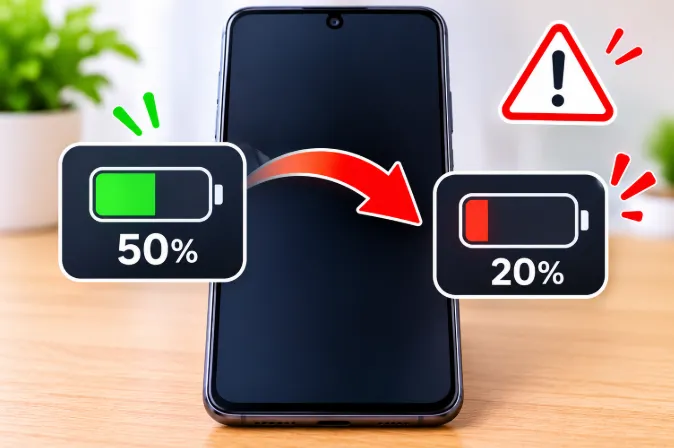
You glance at your phone, it says 50%, and a few minutes later it says 20%. You did nothing unusual. It feels like the phone lost half its charge out of nowhere, and the natural worry is that the battery is dying or something is secretly draining it.
Here is the part most guides skip: in many cases, the battery did not lose 30% of its energy that fast. What changed is the number on the screen. The battery percentage is an estimate, and in certain conditions the estimate is badly wrong. Sometimes the cause is harmless and temporary. Sometimes it is an early sign that the battery is wearing out. This guide helps you tell which one you have, using tests you can do in about ten minutes, and then shows you what to do.
Quick Answer: Why Battery Percentage Drops Suddenly
A sudden drop from 50% to 20% usually comes from one of these causes:
- Voltage sag from an aged battery that cannot deliver power under load.
- Fuel gauge calibration drift, where the phone's estimate no longer matches the real charge.
- Cold temperature, which temporarily raises the battery's internal resistance.
- A heavy hidden load, such as a stuck app, weak signal, or heat.
- Fresh software or a new setup, which resets battery statistics.
If the percentage partly climbs back after the phone rests, suspect voltage sag and a worn battery. If it stays at the lower number, suspect a gauge correction or real background drain.
What Is Actually Happening Inside Your Phone
The percentage is an estimate, not a measurement
A phone has no fuel tank sensor. A small chip called the fuel gauge estimates the percentage from battery voltage, the current flowing in and out, temperature, and a stored model of how your battery behaved when it was healthy.
When the real battery drifts away from that stored model, the estimate becomes inaccurate. The phone eventually notices and corrects itself in one step. That is why you often see a long stretch of slow, normal drain, followed by an abrupt fall. The energy did not vanish. The display caught up with reality.
Why the middle of the range is where drops appear
Lithium-ion batteries do not discharge in a straight line. Voltage stays fairly flat through the middle and drops faster near the bottom. The gauge relies heavily on voltage, so when a worn battery's voltage dips for any reason, the gauge reads the dip as a lower charge level. The middle range gives an inaccurate model the most room to be wrong, which is why people notice jumps around 50%, 40%, or 30% rather than near full.
Voltage sag, the hidden cause behind most sudden drops
As a battery ages, its internal resistance rises. Think of it like a hose that has partly clogged. It can still hold water, but it cannot deliver a big burst quickly. When you open the camera, start a game, or turn on navigation, the phone demands a large burst of current. On a worn battery, the voltage briefly drops well below normal during that burst. The fuel gauge sees the low voltage and shows a much lower percentage.
When the burst ends, the voltage recovers, and the percentage may rise by a few points. That recovery is the signature of voltage sag and one of the clearest signs of battery wear.
The Most Common Causes, Ranked by How Often They Happen
1. An aged battery with high internal resistance
Most phone batteries show noticeable wear after roughly 500 to 800 full charge cycles, although heat and charging habits change this a lot. Early signs include fast drops in the mid-range, the phone shutting off at 10% to 20%, and a battery that feels fine in the morning and collapses by afternoon. These often appear well before capacity looks terrible on paper.
2. Fuel gauge calibration drift
If you often charge in short top-ups, rarely let the battery go low, or rarely reach a full charge, the gauge loses its reference points. Software updates, battery replacements, and restoring a backup can also confuse it. The result is a percentage that can be off by 10 to 30 points and then snaps back.
3. Cold temperature
Cold slows the chemical reaction in the cell and raises resistance. A phone that behaves normally indoors can fall from 50% to 20% quickly in winter air, then recover when it warms up in your pocket. The cold itself usually does not damage the battery, but it exposes a weak one.
4. A heavy load you cannot see
Gaming, video calls, GPS, hotspot sharing, camera recording, and a weak signal all push the processor and modem hard. Heat makes both real drain and gauge errors worse. If your phone also runs hot in other situations, such as when it gets hot while charging with the original charger, heat may be adding to the inaccurate readings.
5. Weak signal and constant network switching
In poor coverage, the modem raises its transmit power and keeps searching for towers. This quietly consumes a lot of energy. If your drops mostly happen away from Wi-Fi, read about why a phone battery drains faster on mobile data and check whether that matches your pattern.
6. A recent update or a restored backup
After a major update, the phone re-indexes files, optimizes apps, and may reset its battery statistics. For a few days the percentage can behave strangely. This usually settles by itself.
7. A swollen or damaged battery
If the back panel is lifting, the screen is pushing up at the edges, or the phone no longer sits flat, this is a safety issue, not a software one. More on this later in the article.
How to Tell a Glitch From a Failing Battery
Most articles jump straight to "replace the battery." Use these three tests first. They take little time and need no apps.
The rest-and-recover test
- Note the percentage right after a sudden drop.
- Lock the phone, switch on airplane mode, and leave it alone for 10 minutes.
- Check the percentage again.
If the number rises by a few points, the drop was voltage sag, which points to an aging battery. If it stays the same, the gauge most likely corrected itself, which points to calibration.
The screen-off drain test
Charge to 100%, turn the screen off, and leave the phone idle for one hour on Wi-Fi. A healthy phone usually loses about 1% or less. Losing 3% to 5% or more means something is running in the background, and part of your sudden drop may be real consumption rather than a display error.
The consistency check
Write down the percentage where each drop happens for a few days. If the drops repeat around the same level, such as 40% to 50%, a worn battery is the likelier cause. If they happen at random levels, calibration or software is more likely.
What your results usually mean
- Recovers after rest, drops during heavy tasks: voltage sag from wear.
- Does not recover, happens at random levels: gauge calibration.
- High idle drain: a background app, bad signal, or a software bug.
- Only happens in the cold: temperature effect on a battery that is already aging.
Why the Battery Drops Fast Only During Camera, Gaming, or Navigation
Many people notice sudden drops only when they use one demanding feature. That pattern is useful, because it narrows the cause.
Camera and video recording
The camera uses the processor, image signal hardware, screen, and sometimes the flash at once. The combined current spike is large. A worn battery sags during that spike, and the percentage can fall by 10% or more in moments. If the camera is the only trigger, voltage sag is a strong suspect.
Gaming
Games push the processor and graphics chip and heat the phone. Heat plus load is a hard combination for an older battery. If your phone drops quickly during games, lower the graphics quality and frame rate cap, and avoid playing while the phone is also charging, since that adds heat.
Navigation and GPS
Navigation keeps the screen on, the GPS active, and the mobile data busy, often in a hot car, which makes it a tough test for the battery. Use a phone mount away from direct sun, and avoid charging at full speed in a hot cabin.
What this tells you
If the percentage falls only during these tasks and then recovers when you stop, the battery is the problem rather than the apps. If it falls steadily even when idle, look at background activity instead.
Battery Health Says 100% but the Percentage Still Drops
This is one of the most confusing situations, and many people search for it without a good answer. A battery health reading is an estimate of maximum capacity. It does not directly measure how well the battery behaves under load. Two things can be true at the same time:
- The reported capacity looks fine, and
- The battery still sags under a heavy burst because of resistance, or the gauge is out of calibration.
Health numbers can also lag behind real condition, because the phone updates them slowly after many cycles. If the health figure looks perfect but you see sudden drops, run the rest-and-recover test and the calibration steps below before assuming the battery is fine, or assuming it has failed.
New Phone Battery Dropping Suddenly: Why It Happens
A brand-new phone should not have a worn battery, so the cause is almost always software or setup:
- Indexing and app optimization. For the first few days, the phone indexes photos and files and optimizes apps in the background, which uses extra power.
- Restored backups. Restoring dozens of apps starts many background processes at once.
- An uncalibrated gauge. The gauge needs several normal charge cycles to learn the battery's behavior.
- High brightness and refresh rate defaults. New phones often ship with the smoothest, most power-hungry settings.
Give it a week of normal use with full charge cycles. If the sudden drops continue after that, or the phone also shuts off early, ask the seller or manufacturer about the battery, since a defective unit is covered by warranty.
Hidden Causes Most Guides Miss
Low storage space
When storage is almost full, the phone struggles to write temporary files and run apps smoothly, which makes the processor work harder. Keeping a reasonable amount of free space helps overall performance and can reduce unexplained drain.
One stuck or misbehaving app
A single app caught in a loop can keep the processor busy while the screen is off. Check the battery usage list, and if one app shows much higher usage than its screen time explains, force stop it, update it, or reinstall it.
A weak or damaged charging port and cable
A poor connection can lead to charging that starts and stops, and the gauge may end up with odd references. If your charging looks unreliable, read about when a phone shows charging but the battery is not increasing, since the two problems sometimes appear together.
Too many background permissions
Apps with always-on location, background refresh, and constant notifications wake the phone repeatedly. Setting location to "while using" for most apps often gives a noticeable improvement.
Always-on display and high refresh rate
These features add steady drain and, on a worn battery, can contribute to the dips that cause sudden jumps. Test with them off for a day.
Battery Myths That Do Not Help Anymore
"Drain it to 0% regularly to calibrate"
Modern lithium-ion batteries do not need this, and repeated deep discharge ages them faster. One controlled cycle, shown below, is enough when you really need to recalibrate.
"Clear battery stats to fix the percentage"
On older phones, deleting the battery statistics file was said to reset the gauge. On modern phones, this does little because the gauge data lives on the hardware, not in a file you can wipe, and the method often needs special access.
"Keep it plugged in overnight and it will damage the battery instantly"
Modern phones stop charging at full. Long periods at 100% and heat age a battery faster, but one night plugged in will not harm it. Using the optimized charging features described below reduces the stress.
"Task killer apps save battery"
Force closing apps all day often makes things worse, because relaunching them from scratch uses more energy than leaving them suspended.
How to Check Battery Health and Cycle Count
On iPhone
Go to Settings, then Battery, then Battery Health & Charging. Look at Maximum Capacity. Many people start seeing sudden shutdowns and drops once this falls below about 80%. On recent iOS versions, the same screen can also show the cycle count. If it does not, you can find it through a service diagnostic.
On Samsung phones
Open the Samsung Members app and run a battery diagnostic, or look in Settings under Battery and device care. Newer versions show battery health information in the battery section.
On Pixel and other Android phones
Some recent Pixel phones show battery health in Settings under Battery. On other brands, the option may be hidden or missing. In that case, a service center can read cycle count and capacity with a diagnostic tool, and some phones respond to a dialer code that opens a battery information page, although that varies by brand and software version.
How to read the numbers
- Above 90% capacity: healthy, and sudden drops likely come from calibration or software.
- 80% to 90%: normal wear. Sudden drops may begin under heavy load or cold.
- Below 80%: noticeable wear. Replacement is worth considering if you have daily problems.
Fixes That Actually Help
Recalibrate the fuel gauge safely
- Use the phone normally until the battery falls to around 10% to 15%.
- Charge to 100% without interruption using the original or a quality charger.
- Leave it plugged in for another 30 to 60 minutes after it reaches 100%.
- Unplug and use it normally.
One clean cycle like this helps the gauge relearn its limits. Do not repeat it often, because frequent deep discharge is not good for the battery.
Restart and install pending updates
A restart clears stuck processes that distort power use. Manufacturers also fix gauge and power bugs in updates, so install any pending system and app updates.
Find and control the real drain
Open the battery usage screen and look for an app using far more than expected, especially in the background. Restrict its background activity, update it, or remove it.
Reduce the load on an aging battery
- Lower screen brightness and use the standard refresh rate.
- Turn off 5G if your area has weak coverage.
- Use battery saver mode when you are below 50%.
- Avoid heavy games and video recording when the battery is under 30%.
- Keep the phone warm in winter, such as in an inner pocket, rather than in a bag.
Charge in a way that protects the battery
Heat and long periods at 100% age a battery faster. Habits like using your phone while charging add heat and stress, so try to avoid heavy use on the charger.
Use your phone's battery protection features
- iPhone: Optimized Battery Charging learns your routine and delays charging past 80% until you need it. Newer models also offer a charge limit option.
- Samsung: Protect Battery caps charging at a lower level, commonly 80%, which reduces stress for people who keep the phone plugged in for long periods.
- Pixel: Adaptive Charging slows charging overnight so the phone reaches full close to your wake-up time, and some models offer a charge limit.
Names and menu locations differ by model and software version, so search your battery settings for "protect," "optimized," or "adaptive."
Try a factory reset only as a last software step
If tests show high idle drain and you cannot find the cause, a backup and factory reset can remove a deeper software problem. It cannot fix a worn battery, so do it only after the other steps.
Should You Keep Using the Phone or Replace the Battery?
Keep using it if
- The drops are occasional and the percentage stays lower rather than recovering.
- Battery health is above 85% to 90%.
- The phone does not shut off unexpectedly.
- The problem started right after an update or restore and is improving.
Replace the battery if
- The percentage recovers after resting, which signals voltage sag.
- The phone shuts off above 10% to 20%.
- Maximum capacity is below about 80%.
- You must charge more than twice a day with normal use.
- The battery is swollen or the phone gets very hot with light use.
What a replacement usually costs
Prices vary by brand, model, and country. In most cases, a battery replacement at an authorized service center costs a small fraction of a new phone and often fixes the problem completely. Ask for the quote before the work starts, confirm that the part is genuine, and check whether a warranty applies. Unbranded cheap batteries can have poor gauge accuracy and short life, so a low price is not always a good deal.
When a Sudden Drop Is a Safety Warning
Contact a technician soon if fast drops come with any of these:
- The back cover or screen is bulging or lifting.
- The phone gets very hot during light use.
- You notice a strange smell or leaking liquid.
- The phone turns off at 20% to 30% and will not restart until plugged in.
Do not keep charging a swollen battery, do not press on it, and do not puncture it. Stop using the phone and have it inspected.
Does the Same Problem Happen on Laptops and Other Devices?
Yes. Laptops use the same battery chemistry and the same kind of fuel gauge, so the reasons are very similar: calibration drift, wear, and heat. If your laptop has a similar issue, this article on why a laptop battery drops suddenly from 40% to 10% covers the laptop side.
Frequently Asked Questions
Why does my phone battery drop fast after 50%?
The middle of the discharge curve is where an inaccurate gauge or a worn battery shows its weakness. Voltage dips under load make the phone think it has less charge than it really does.
Is it normal for a battery to drop 30% in minutes?
No. A healthy phone does not lose 30% that quickly unless you do something very heavy in extreme heat or cold. Repeated drops like this usually mean calibration problems or battery wear.
Why does my battery jump from 30% to 15%?
The fuel gauge is probably correcting a wrong estimate. If it happens often, check battery health and run the rest-and-recover test.
Why does my phone shut off suddenly at 20% or 30%?
The battery cannot supply enough voltage under load, even though charge remains. This is a classic sign of an aged battery.
Why does my phone drop to 1% and shut off?
When the voltage dips below the minimum the phone needs, it shuts down to protect itself, and the percentage may show 1% just before. This often means the battery is worn.
Why does the percentage go back up after a few minutes?
The voltage recovers once the heavy load ends. This rebound is a sign of voltage sag and usually points to an aging battery.
Can a software update fix sudden battery drops?
Sometimes. Updates can improve gauge accuracy and fix power bugs, but they cannot restore a worn battery.
Does cold weather cause sudden battery drops?
Yes. Cold raises internal resistance, so the percentage can fall quickly and then recover when the phone warms up.
Why does my new phone battery drain so fast at first?
Indexing, app optimization, restored backups, and an uncalibrated gauge cause extra drain in the first days. It usually settles within a week.
Why does battery health show 100% but the battery still drops?
Battery health estimates capacity and updates slowly. It does not fully show how the battery behaves under load, so gauge errors and voltage sag can still occur.
How many charge cycles before a phone battery starts dropping suddenly?
Many batteries show noticeable wear between 500 and 800 cycles, but heat, charging habits, and build quality affect this a lot.
Should I replace my battery if the percentage jumps?
If the jumps are frequent, capacity is low, or the phone shuts off early, replacement is the most reliable fix. If it happens rarely after an update, try calibration first.
Will a factory reset fix a sudden battery drop?
It can fix software-related causes but not a worn battery. Back up your data and try the other steps first.
Is it safe to use a phone with a sudden battery drop problem?
Usually yes, if the battery is not swollen or very hot. Be careful about relying on it for navigation or emergencies, since it may shut off without warning.
Final Thoughts
A sudden fall from 50% to 20% is nearly always a measurement problem, caused either by calibration drift or by a battery that can no longer hold its voltage under load. Run the rest-and-recover test and the screen-off drain test, check your battery health, and fix what software can fix. If the signs point to wear, a battery replacement from a trusted service center is usually the cleanest and cheapest solution, and it can make an older phone feel new again.